Database Viewer
With the dbviewer plugin you can inspect and edit the data of a running RxDB database. There are two ways to use it: mount it into any DOM element of your own application with mountRxDBViewer(), or connect to the database from the outside with connectRxDBViewer(), which pairs the hosted viewer page with the app over WebRTC. Both render the same full devtool: a data grid with a Mango query bar, a JSON view, a document detail drawer, and panels for schema analysis, query analysis, replication, the change stream and storage statistics. It works over a live RxDatabase and over a static dump created with the json-dump plugin.
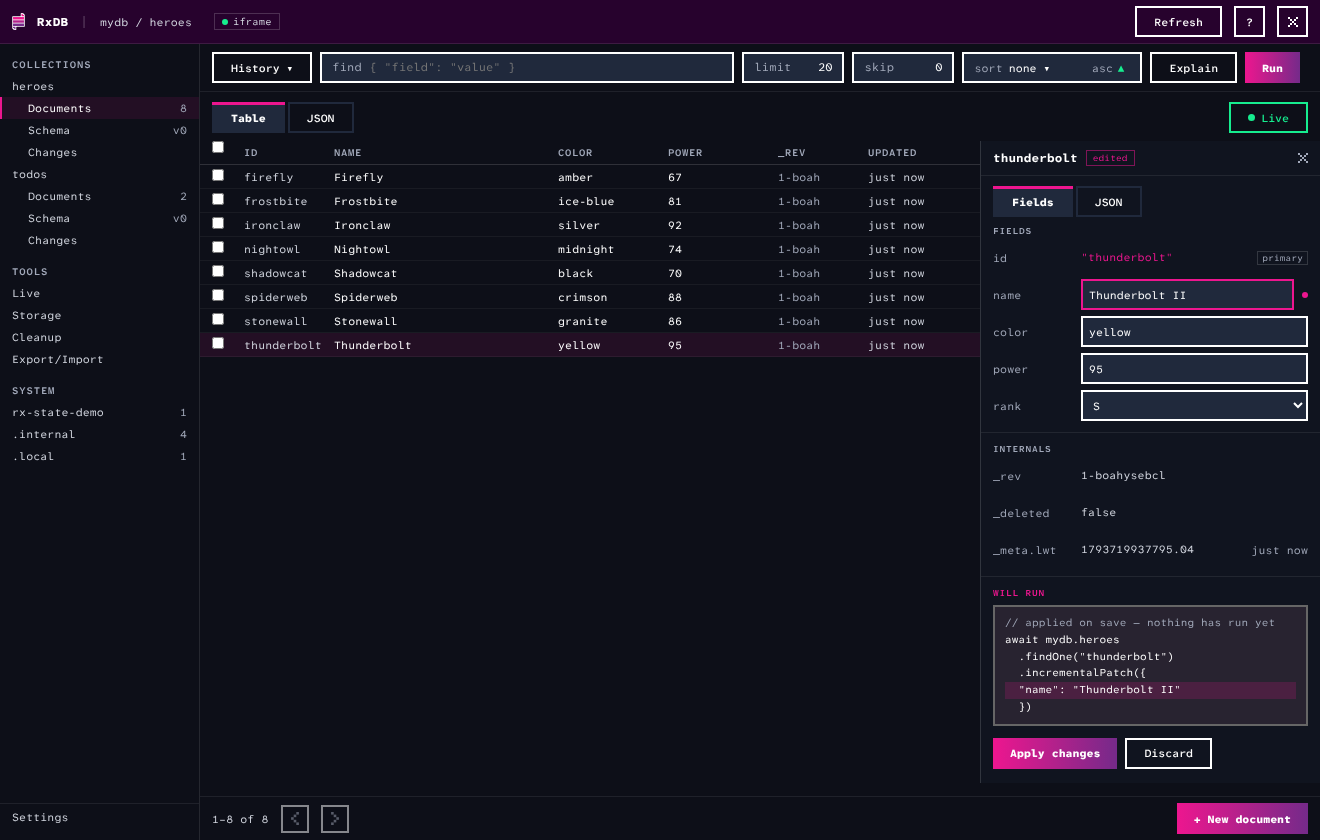
Key features:
- Data grid and JSON view: Browse documents of any RxCollection, paginated with
limit(default: 20) andskipinputs and a sort dropdown withasc/descdirection next to the query bar. Clicking a column header sorts the whole collection, not only the page. The grid renders only the visible rows, so a limit of10kdoes not bloat the DOM. Multi-select works across pages with a select-all-matching action for bulk delete and export, and a Live mode, on by default, updates the result live as documents change. - Mango query bar: Run MongoDB-style (Mango) selectors against a collection, with history and favourites. The input also accepts relaxed JavaScript object syntax like
{ name: 'foo' }, unquoted keys and single quotes are converted to JSON. Syntax errors show the exact character position and previous results stay visible. - Document drawer: Shows fields, internals (
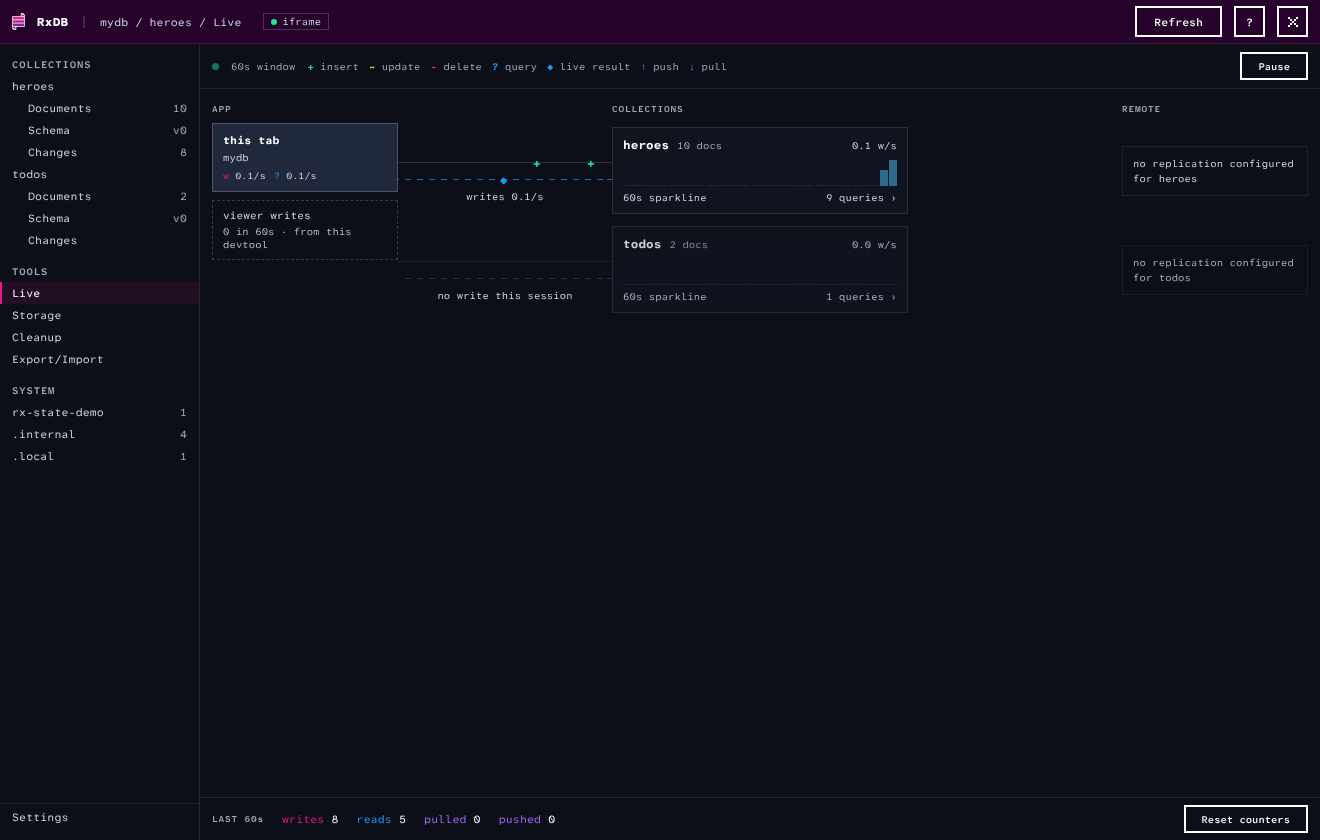
_rev,_meta.lwt), attachments with inline image previews, and a WILL RUN block that previews the exact call before you apply staged edits:insert()for new documents,incrementalPatch()with only the changed fields for edits. A JSON tab edits the whole document as raw JSON, with the primary key protected against accidental changes. - Live activity map: Draws the database as a map from app to collections to remote endpoints. Write, query and replication events flow as glyph particles, each collection node shows a 60 second sparkline and its cached RxQuery count. No document contents are drawn, only names, counts and rates, so the screen is safe to share.
- Schema panel: Opened from the Schema entry below each collection in the sidebar. Samples documents and shows per-field type shares, presence percentages and value details, plus violations against the declared schema. A toggle switches to the declared JSON schema itself.
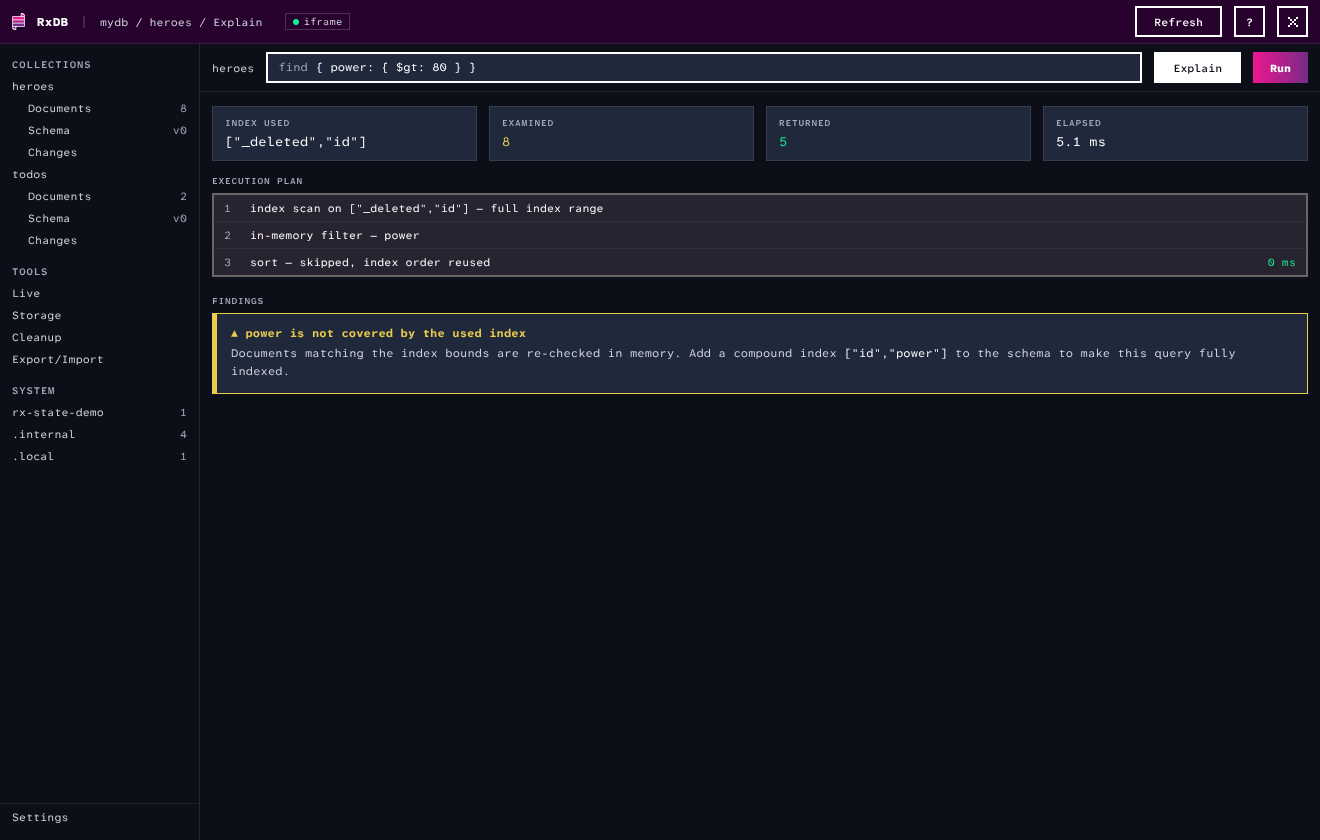
- Explain button: Explains the current query with the used index, an execution plan derived from the query planner and findings like missing compound indexes or
$regexfull scans. - Changes and replication feeds: A network-tab style list of a collection's writes with a unified diff per change, opened from the Changes entry below the collection, downloadable as a JSON array, and per-collection pull/push states with a live feed of replicated documents.
- Storage panel: Engine, document counts, tombstones and attachment bytes per collection.
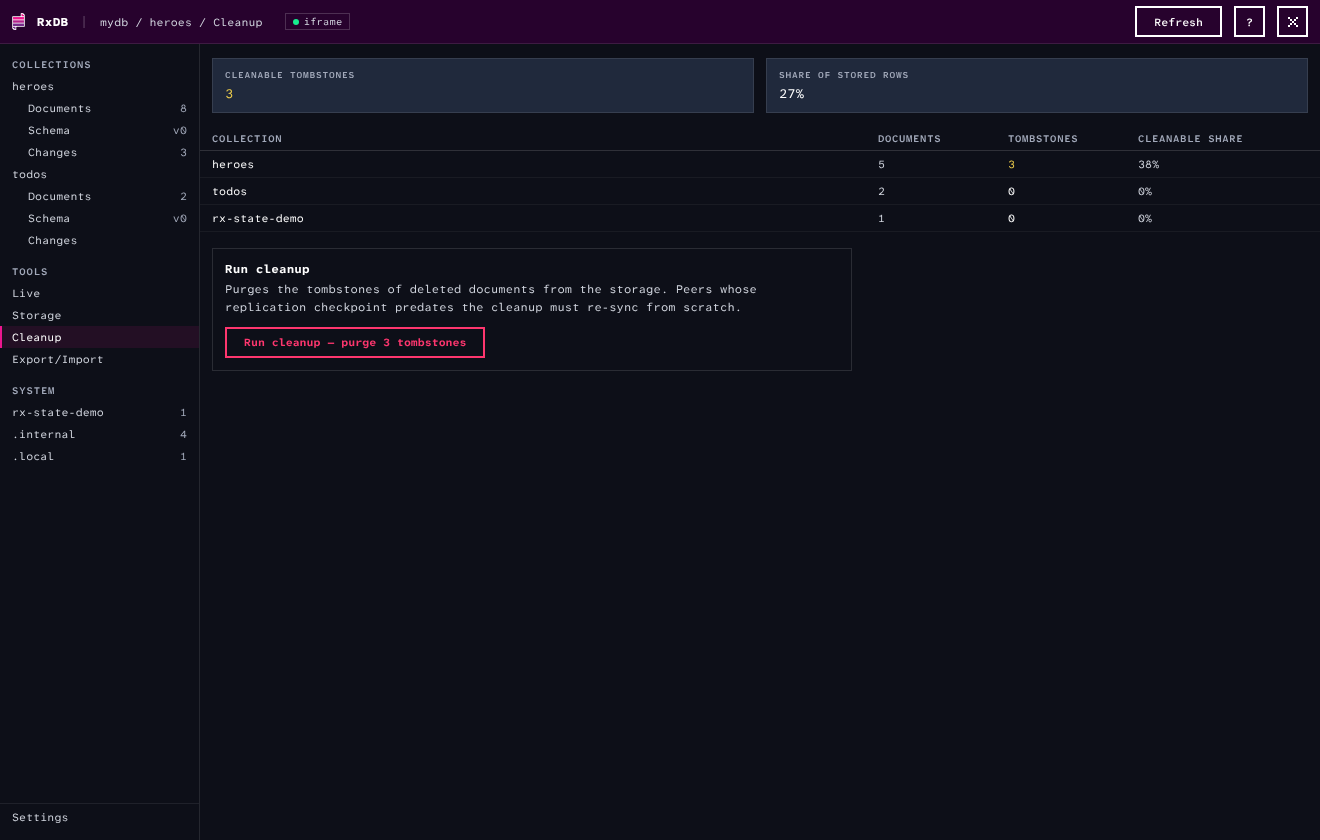
- Cleanup tool: Shows per collection how many tombstones could be purged and how much of the stored data that is, and runs a cleanup when the cleanup plugin is loaded.
- Export tool: Downloads the database as one JSON file. You can pick which collections to include and set an optional MongoDB-style (Mango) selector per collection, so only matching documents are exported.
- System collections: The database internal store, local documents and the collections behind RxState instances are listed in a SYSTEM group. They are view-only: you can browse, query and export them, but editing is disabled.
The live activity map shows the write, query and replication flow of the database in realtime:
The Explain button analyzes the current query with the index, the execution plan and findings:
The cleanup tool shows how many tombstones a cleanup could purge:
Below 640px the viewer switches to stacked touch screens with the same collections and tools.
How it works
The plugin itself contains no UI code. mountRxDBViewer() creates an iframe that loads the viewer page, a single self-contained html file hosted at rxdb.info/dbviewer/index.html, and serves the database to it over postMessage. This keeps the whole viewer UI out of the rxdb build, so the plugin adds only the small bridge to your bundle. Data access, the query planner analysis and the event streams run in your application window, the page inside the iframe is plain UI and never gets direct access to the database object.
When your app has to work without network access, download the page once and serve it from your own origin, see Self-Hosting the Viewer Page.
Usage
Mount the viewer into an element and remove it when you are done:
import { createRxDatabase } from 'rxdb';
import { mountRxDBViewer } from 'rxdb/plugins/dbviewer';

const db = await createRxDatabase({
    name: 'mydb',
    storage: someStorage
});

const viewer = mountRxDBViewer({
    database: db,
    parent: document.getElementById('viewer-panel')
});

// later
viewer.remove();
The plugin adds about 13 kB (gzip) to your bundle when you import mountRxDBViewer, and about 48 kB (gzip) when connectRxDBViewer with its WebRTC connection is included. Because the viewer is a devtool that is not needed on page load, it is recommended to load the plugin with a dynamic import() at the moment the viewer opens. Then the plugin costs nothing on the initial page load:
async function openViewer(db: RxDatabase, parent: HTMLElement) {
    const { mountRxDBViewer } = await import('rxdb/plugins/dbviewer');
    return mountRxDBViewer({ database: db, parent });
}
You can also register the plugin to get a launchDbViewer() method on the database:
import { addRxPlugin } from 'rxdb';
import { RxDBDbViewerPlugin } from 'rxdb/plugins/dbviewer';
addRxPlugin(RxDBDbViewerPlugin);

const viewer = db.launchDbViewer({ parent: document.body });
Usage with Frameworks
In a framework component, mount the viewer when the component appears and call remove() when it is destroyed. The close$ observable tells the host when the close icon was clicked, the host then decides what closing means, for example hiding the panel.
import {
    AfterViewInit, Component, ElementRef,
    NgZone, OnDestroy, ViewChild, inject
} from '@angular/core';
import type { RxDBViewerHandle } from 'rxdb/plugins/dbviewer';
import { DatabaseService } from '../services/database.service';

@Component({
    selector: 'db-viewer',
    template: '<div #viewerHost style="height: 500px"></div>'
})
export class DbViewerComponent implements AfterViewInit, OnDestroy {
    private dbService = inject(DatabaseService);
    private zone = inject(NgZone);
    private viewerHandle?: RxDBViewerHandle;
    @ViewChild('viewerHost') viewerHost!: ElementRef<HTMLElement>;

    ngAfterViewInit() {
        // mounting outside of the angular zone keeps the
        // viewer updates out of change detection. The dynamic
        // import() keeps the plugin out of the main bundle.
        this.zone.runOutsideAngular(async () => {
            const { mountRxDBViewer } = await import('rxdb/plugins/dbviewer');
            this.viewerHandle = mountRxDBViewer({
                database: this.dbService.db,
                parent: this.viewerHost.nativeElement
            });
        });
    }
    ngOnDestroy() {
        if (this.viewerHandle) {
            this.viewerHandle.remove();
        }
    }
}
A complete integration with an "Open DB Viewer" toggle and the close$ wiring is in the angular example.
Options
const viewer = mountRxDBViewer({
    /**
     * The live database to inspect.
     * Either database or dump must be given.
     */
    database: db,
    /**
     * (optional) A static export created with db.exportJSON().
     * Opens the viewer in read-only dump mode.
     */
    dump: myDumpJson,
    /**
     * (optional) Filename shown in the dump banner.
     */
    dumpFilename: 'mydb-2026-08-05.json',
    /**
     * (optional) Element the viewer is mounted into.
     * [default=document.body]
     */
    parent: someElement,
    /**
     * (optional) Rows per page in grids and results.
     * [default=100]
     */
    pageSize: 100,
    /**
     * (optional) Renders a close icon in the top bar.
     * Clicking it emits on the close$ observable of the handle,
     * the host decides what closing means.
     * [default=false]
     */
    showCloseButton: true,
    /**
     * (optional) Url of the viewer page that is loaded
     * into the iframe. Point this to a self-hosted copy
     * when your app must work without network access.
     * [default='https://rxdb.info/dbviewer/index.html']
     */
    viewerUrl: 'https://example.com/dbviewer.html'
});

viewer.close$.subscribe(() => {
    // hide the panel that contains the viewer
});
Self-Hosting the Viewer Page
By default the iframe loads the viewer page from https://rxdb.info/dbviewer/index.html. When your app must work offline, or your security policy forbids loading pages from other origins, serve the page from your own origin instead. The page is one self-contained html file without further assets, so self-hosting is a file copy:
- Get the file. Download it once from rxdb.info/dbviewer/index.html, or build it from the rxdb repository with
npm run build:dbviewer, which writes it todocs-src/static/dbviewer/index.html. - Serve it as a static asset of your app, for example as
public/dbviewer.html. The page must be served over http(s), afile://url does not work becausepostMessageneeds an origin. - Point the plugin at it with the
viewerUrloption:
const viewer = mountRxDBViewer({
    database: db,
    viewerUrl: 'https://example.com/dbviewer.html'
});
The angular example does this in its postinstall script: it copies the built page into src/assets/dbviewer.html and mounts with viewerUrl: 'assets/dbviewer.html'.
Keep in mind that the page and the plugin talk over a versioned postMessage protocol. When you update rxdb, refresh your self-hosted copy so both sides match.
Remote Pairing over WebRTC
When the database runs on a device you cannot attach a debugger to, for example a phone in field testing, pair the hosted viewer page with that device over WebRTC. In the app, connect the database and open the returned url in any browser:
import { connectRxDBViewer } from 'rxdb/plugins/dbviewer';

const viewer = await connectRxDBViewer({
    database: db,
    /**
     * (optional) The pairing room id. Everyone who knows it
     * gets FULL read and write access to the database,
     * so treat it like a password.
     * [default=a random 18 character token]
     */
    roomId: 'a-long-random-id',
    /**
     * (optional) Url of the WebRTC signaling server.
     * The default server is for tryouts only, in production
     * you run your own, see the replication-webrtc docs.
     * [default='wss://signaling.rxdb.info/']
     */
    signalingServerUrl: 'wss://example.com/signaling',
    /**
     * (optional) Url of the hosted viewer page.
     * [default='https://rxdb.info/dbviewer/index.html']
     */
    viewerUrl: 'https://example.com/dbviewer.html'
});

// the full url to open the viewer with, for example
// https://rxdb.info/dbviewer/index.html#room=abc...&signaling=...
console.log(viewer.url);

// later: stop serving the database
await viewer.close();
The url carries the room id and the signaling server in its hash, so the page connects on open without further input. The angular example wires this up behind a debug flag: opening the app with ?debug=dbviewer-webrtc connects the database and logs the pairing url to the console. Opening the page without a hash shows the same connect form for manual entry:
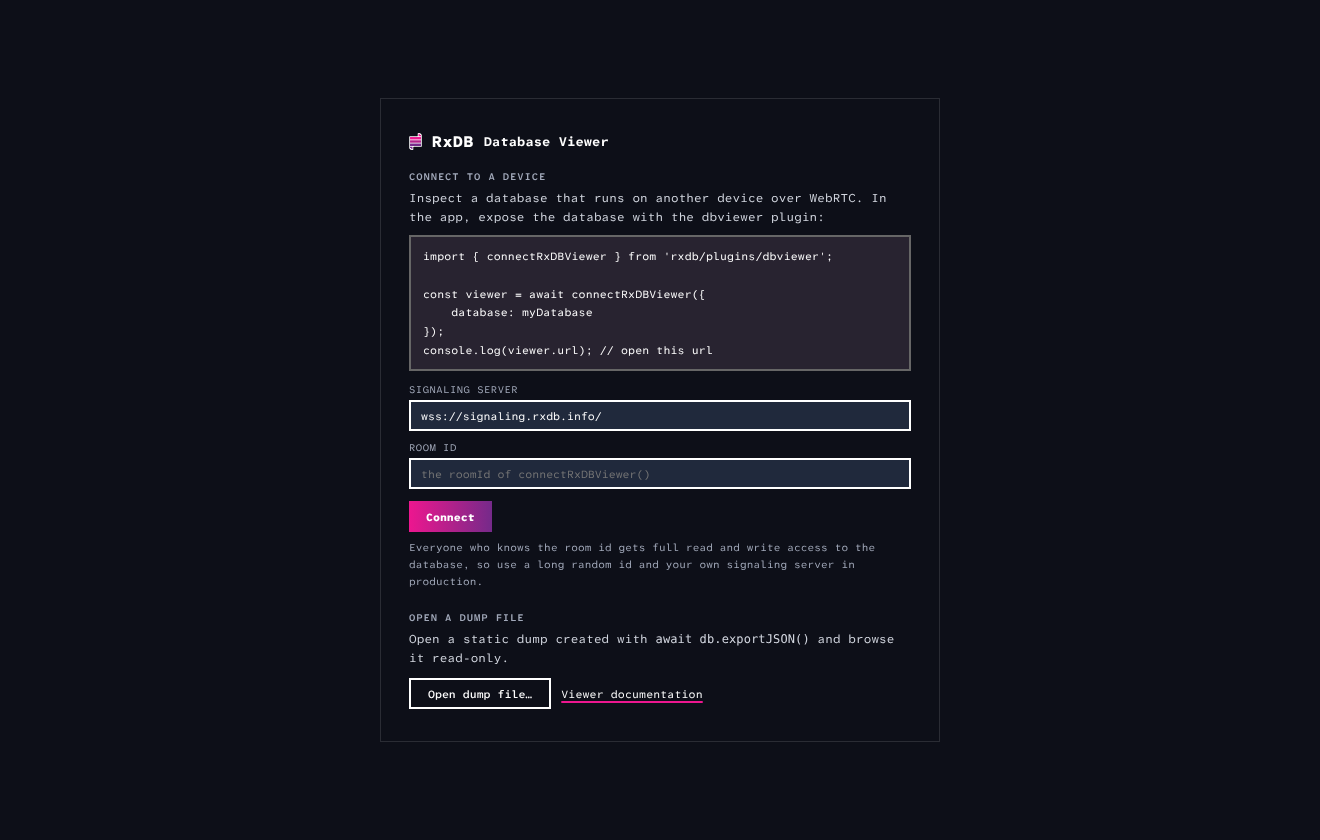
The full devtool works over the channel: grids, queries, edits, the explain view and the live feeds, because it speaks the same bridge protocol as the iframe mount.
The signaling server only brokers the connection, the data itself flows directly between the browser and the device. You can run your own signaling server with startSignalingServerSimplePeer(), see the WebRTC replication docs.
Dump mode
When you cannot reach the device that runs the database, work from an export instead. On the device, run await db.exportJSON() with the json-dump plugin, save the result, and open it in the viewer:
import { mountRxDBViewer } from 'rxdb/plugins/dbviewer';

mountRxDBViewer({
    dump: exportedJson,
    dumpFilename: 'mydb-2026-08-05.json'
});
Editing, the Live mode, the Live map and the feeds are disabled with a "not available on a dump" hint. The grid, queries, the Schema panel and the Storage counts work fully. A dump file can also be opened at runtime from the Export/Import tool.
Editing is explicit
The viewer never writes silently. Edits in the grid or the drawer are staged first, and the WILL RUN block always shows the exact call that Apply changes will execute. Edits of an existing document run incrementalPatch() with only the changed fields, so middleware hooks of the insert path never fire for an update:
// applied on save, nothing has run yet
await mydb.todos.findOne("a1b2c3").incrementalPatch({
  "title": "Buy milk (2%)"
})
New documents run insert(). When a write fails, for example because the schema validation rejects the document, the error shows as a popup with the parameters of the RxError serialized as JSON.
Deleting documents opens a confirmation that states the blast radius: how many documents match, that deletes replicate to connected peers, and that tombstones remain until cleanup. The delete button stays disabled until you type the collection name.
Limitations
- The viewer renders into the DOM, so it runs in browsers, Electron renderers and webviews, but not in plain Node.js.
- By default the viewer page is loaded from rxdb.info, which needs network access on first load. For offline apps, host the page yourself and set
viewerUrl. - Sorting in the grid orders the current page, not the whole collection, because arbitrary fields are not guaranteed to be indexed.
- The reads counter of the Live map is derived from the query cache counters, so reads that bypass the cache are not counted.
- Remote pairing to a database on another device is not part of this plugin yet. Use dump mode or the remote storage instead.
FAQ
Can I inspect an RxDB database in production?
Yes. The viewer is a normal plugin and mounts wherever you decide to render it, for example behind a feature flag or an admin route. Keep in mind that everyone who can open the viewer can read and edit all data of the local database.
Does the dbviewer plugin increase my build size?
No, not in a relevant way. The viewer UI is a hosted static page that loads inside an iframe, only the mount function and the postMessage bridge are part of the rxdb build. Apps that never call mountRxDBViewer() do not load the page at all.
Can the viewer page read my database when I do not open it?
No. The page only receives data through the postMessage bridge that mountRxDBViewer() attaches, and the bridge only answers requests of the iframe it created. Without a mount there is no iframe and no bridge.
Does the viewer work with any RxStorage?
Yes. The viewer talks to the database through the normal query API, so every RxStorage works. The Storage panel additionally counts tombstones through the storage instance, which works on all official storages.
Does the viewer show replications that start after mounting?
Yes. The Replication panel polls for states created with replicateRxCollection() or one of the replication plugins in the same JavaScript context, so states that start later are picked up automatically.

 Ask a question on the forums about Database Viewer

